Connect Varify to your systems
Making your first call only takes two steps: Quickstart below walks through it. Everything after that is the full reference, with real request and response examples instead of just a table of routes. Looking for a tour of the app itself instead? Check out How It Works.
Get connected in 2 steps
No app registration, no OAuth handshake. Get a key, send it as a header, you're calling the API.
1. Get an API key
In the app, go to Import Data → API Keys and click + New Key. You'll need Admin access for this. Ask whoever owns the account if you're not sure you have it.
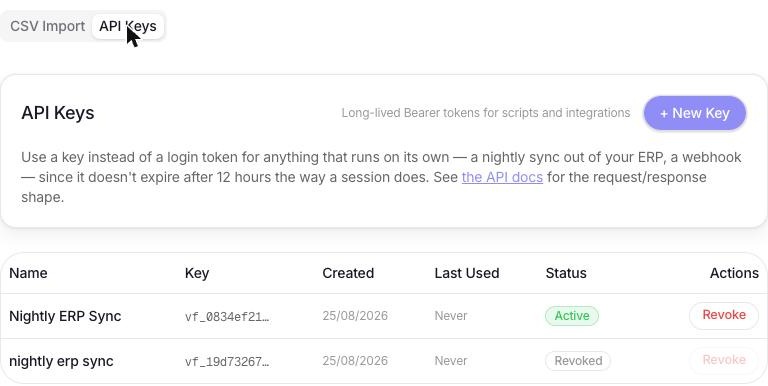
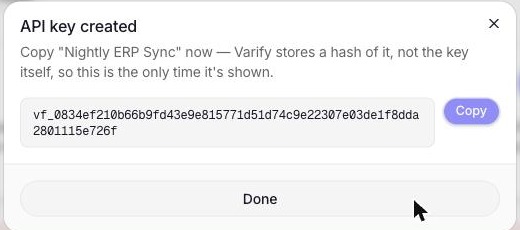
Name it after whatever will use it and create it. The key is shown exactly once. Copy it before closing the dialog, Varify only ever stores a hash of it.
2. Make your first request
Send the key as a standard Bearer token on any endpoint below:
curl https://api.get-varify.com/api/items \
  -H "Authorization: Bearer vf_98a6071ce41cd2b6dfded4d2fff46cdf5fdb7c2a4d92cbd6642ba7e67d116b50"
That's the whole flow. From here, jump to Items to pull your catalogue, or Import to push data in on a schedule. If a request ever fails, see Authentication & errors below for what the response looks like and why.
CSV/Excel vs. REST API
Both paths run through the exact same import engine, so validation and the end result are identical either way. The only real question is which one fits how your data actually gets to you.
CSV / Excel import
Upload a file from Import Data. A good fit when a spreadsheet is already your source of truth, or you just need to load something once, download the template, fill it in, and upload it. No developer needed.
REST API
Push JSON rows straight to POST /api/import from your own system, authenticated with an API key. This is what you'd reach for with an ongoing sync, a nightly job out of your ERP, a webhook off an inventory system, where nobody's manually uploading a file each time.
Either way, Import Data bulk-loads bin locations and their items. Sites need to already exist, but everything else, zones, inventory types, units of measure, gets created automatically as needed. You'll find the full column reference and worked examples for both the file upload and the JSON body under Import below. And if you need finer-grained control over individual bins instead of a full re-import, that's what Locations is for.
Authentication & errors
The reference details for every call below. Still need to actually get a key? That walkthrough lives up in Quickstart.
Every endpoint lives under /api and expects a JSON body, except file uploads, which use multipart/form-data. Every request needs an Authorization: Bearer header. Use an API key for anything running unattended, or the JWT from POST /api/auth/login if you're just testing things by hand. Postman works the same way: set the Authorization tab to Bearer Token and paste either one in.
An API key doesn't expire on its own. It's valid until you revoke it from Import Data → API Keys in the app. A login JWT, on the other hand, expires 30 days after you log in, or sooner if the password is reset. In normal use the app never even touches that JWT directly: logging in sets it as an httpOnly cookie the browser sends automatically. The token field you see in the login response is only there for scripts and tools that can't read that cookie.
A failed call responds with { "error": "message" } and an appropriate status code. Most authenticated routes also need an active subscription. You'll get a 402 if it's missing, cancelled, or past due.
An API key acts as the user who created it, with that user's current role and site access. The label in the top-right corner of each endpoint below is the lowest role that can call it. Below that you get a 403. If the key's creator is demoted or deactivated, the key loses access with them.
Items
Read-only. The source of truth for your item catalogue is a CSV import or a direct REST push, not this API.
/api/itemsAny roleLists the item catalogue, enriched with per-site inventory type, cost, and bins.
Request
GET /api/items?site_id=1&limit=50&offset=0

# All params optional. site_id scopes to one site (must be one you
# have access to); omitted, results merge every site you can see.
# limit (max 500) + offset enable pagination, total count comes
# back in the X-Total-Count response header when limit is set.
Response
[
  {
    "item_id": "11111111-1111-4111-8111-111111111111",
    "name": "Widget",
    "sku": "SKU-1",
    "barcode": "9310036001234",
    "item_description": "10mm galvanized bolt",
    "created_at": "2026-01-14T02:11:00.000Z",
    "uom_id": "44444444-4444-4444-8444-444444444444",
    "uom_name": "Each",
    "inventory_by_type": [
      {
        "inventory_id": "a0a0a0a0-a0a0-4a0a-8a0a-a0a0a0a0a0a0",
        "type_id": "33333333-3333-4333-8333-333333333333",
        "type_name": "Retail",
        "site_id": "11111111-1111-4111-8111-111111111111",
        "site_name": "Main Warehouse",
        "item_cost": 12.5,
        "qty": 40,
        "bins": [
          { "location_id": "55555555-5555-4555-8555-555555555555", "location_code": "A1", "zone": "North" }
        ]
      }
    ]
  }
]/api/items/:skuAny roleFull breakdown of one item by SKU, grouped by site.
Note: 404 if no item in your company has that SKU.
Response
{
  "item_id": "11111111-1111-4111-8111-111111111111",
  "sku": "SKU-1",
  "barcode": "9310036001234",
  "name": "Widget",
  "uom_name": "Each",
  "sites": [
    {
      "site_id": "11111111-1111-4111-8111-111111111111",
      "site_name": "Main Warehouse",
      "type_assignments": [
        {
          "inventory_id": "a0a0a0a0-a0a0-4a0a-8a0a-a0a0a0a0a0a0",
          "type_id": "33333333-3333-4333-8333-333333333333",
          "type_name": "Retail",
          "item_cost": 12.5,
          "qty": 40,
          "bins": [
            { "location_id": "55555555-5555-4555-8555-555555555555", "location_code": "A1", "zone": "North" }
          ]
        }
      ]
    }
  ]
}
Inventory Types
A shared per-company lookup table, used both for classifying stock and for a bin's own zone.
/api/inventory-typesAny roleLists active lookup values, optionally filtered by kind.
Request
GET /api/inventory-types?kind=3

# kind: 3 = inventory type / zone, 4 = unit of measure. Omit for both.
Response
{
  "types": [
    { "type_id": "11111111-1111-4111-8111-111111111111", "company_id": "11111111-1111-4111-8111-111111111111", "kind": 3, "name": "Retail", "is_active": true },
    { "type_id": "22222222-2222-4222-8222-222222222222", "company_id": "11111111-1111-4111-8111-111111111111", "kind": 3, "name": "Raw Material", "is_active": true }
  ]
}/api/inventory-typesManager+Creates a new lookup value.
Note: 409 if that name already exists for this kind (case-insensitive).
Request
{
  "kind": 3,
  "name": "Bulk Storage"
}
Response
{
  "type": { "type_id": "55555555-5555-4555-8555-555555555555", "company_id": "11111111-1111-4111-8111-111111111111", "kind": 3, "name": "Bulk Storage", "is_active": true }
}/api/inventory-types/:idManager+Renames a value and/or retires it (is_active: false) without breaking historical references.
Request
{
  "name": "Bulk Storage - Cold",
  "is_active": true
}
Response
{
  "type": { "type_id": "55555555-5555-4555-8555-555555555555", "company_id": "11111111-1111-4111-8111-111111111111", "kind": 3, "name": "Bulk Storage - Cold", "is_active": true }
}
Locations
/api/locations/binsAny roleFlat list of every bin location across the whole company, a system-wide bin picker.
Response
[
  { "bin_id": "55555555-5555-4555-8555-555555555555", "bin_code": "A1", "zone_id": "22222222-2222-4222-8222-222222222222", "zone": "North" }
]/api/locationsAny roleLists bin locations, with search, site/zone filters, and utilization sort.
Request
GET /api/locations?site_id=1&sort=code_asc

# site_id, zone (zone_id): optional filters.
# search: optional, switches to matching location_code/SKU/item
#   description instead (returns one row per matched item).
# sort: code_asc (default) | code_desc | utilization_desc
Response
{
  "locations": [
    {
      "id": "55555555-5555-4555-8555-555555555555",
      "location_code": "A1",
      "site_id": "11111111-1111-4111-8111-111111111111",
      "site_name": "Main Warehouse",
      "zone_id": "22222222-2222-4222-8222-222222222222",
      "zone": "North",
      "current_count": 3
    }
  ]
}/api/locations/:idAny roleSingle location detail, including assigned items.
Response
{
  "location": {
    "id": "55555555-5555-4555-8555-555555555555",
    "location_code": "A1",
    "site_id": "11111111-1111-4111-8111-111111111111",
    "site_name": "Main Warehouse",
    "zone_id": "22222222-2222-4222-8222-222222222222",
    "zone": "North",
    "current_count": 3,
    "items": [
      { "assignment_id": "a0a0a0a0-a0a0-4a0a-8a0a-a0a0a0a0a0a0", "item_id": "11111111-1111-4111-8111-111111111111", "sku": "SKU-1", "name": "Widget" }
    ]
  }
}/api/locationsAny roleCreates a bin location.
Note: zone_id is optional; omit or send null for an unclassified bin. 409 if the site already has a bin with that code (case-insensitive).
Request
{
  "location_code": "A-04-12",
  "site_id": "11111111-1111-4111-8111-111111111111",
  "zone_id": "22222222-2222-4222-8222-222222222222"
}
Response
{
  "location": {
    "id": "c1c1c1c1-c1c1-4c1c-8c1c-c1c1c1c1c1c1",
    "location_code": "A-04-12",
    "site_id": "11111111-1111-4111-8111-111111111111",
    "site_name": "Main Warehouse",
    "zone_id": "22222222-2222-4222-8222-222222222222",
    "zone": "North",
    "current_count": 0
  }
}/api/locations/:idAny roleUpdates a location code or zone. Send at least one field.
Note: 409 if the new code is already used by another bin at the same site (case-insensitive).
Request
{ "location_code": "A-04-13" }/api/locations/:idAny roleDeletes a location.
Note: 409 if it's been used in a stock take or cycle count. Deleting it would blank that count out of historical reports.
/api/locations/:id/itemsAny roleAssigns an item to a bin. Idempotent: assigning an item already in the bin is a no-op.
Request
{ "item_id": "50150150-1501-4501-8501-501501501501" }Response
{
  "assignment": { "assignment_id": "a0a0a0a0-a0a0-4a0a-8a0a-a0a0a0a0a0a0", "item_id": "50150150-1501-4501-8501-501501501501", "sku": "SKU-1", "name": "Widget" }
}/api/locations/:id/items/:item_idAny roleUnassigns an item from a bin. (Alias: POST .../unassign, same handler.)
Stock Take, export & reports
Sessions themselves are created and counted through the app. These two endpoints let you pull a committed session's results out automatically instead of exporting by hand.
/api/stock-take/sessions/:id/export-csvManager+Full counted-goods CSV for a committed session. Pull results into your own system instead of exporting a file by hand.
Note: 409 if the session is not yet committed.
Response
Content-Type: text/csv
Content-Disposition: attachment; filename="stock-take-88-export.csv"

sku,item_name,inventory_type,location_code,uom,expected_qty,counted_qty,variance,item_cost,financial_impact,status
SKU-1,Widget,Retail,A1,Each,100,98,-2,12.50,-25.00,COMMITTED/api/stock-take/sessions/:id/reportManager+Streams the designed PDF signoff report for a committed session: summary cards, accuracy donut, and a net-impact-by-type chart.
Note: 409 if the session is not yet committed.
Response
Content-Type: application/pdf (binary, streamed inline)Import
Bulk-loads bin locations and items using the same engine behind the Import Data page, just exposed as a REST endpoint. Send a CSV/XLSX file exactly like the page does, or skip the file entirely and send a plain JSON array of rows straight from your own system, an ERP export, a SQL query, a scheduled sync job, whatever you've got.
Imports run in the background so a large ERP export can't time out the request. The flow is three calls:
- Optional:
POST /api/import/previewto see what the file would leave out. POST /api/importreturns202with ajob_id.- Poll
GET /api/import/status/:jobIduntilstatusiscompletedorfailed.
Each job is all-or-nothing. If one row is bad, nothing from that job is written. Every import endpoint needs Manager role or higher.
Limits per call: 50,000 rows, a 10 MB file, or a 25 MB JSON body. 50,000 rows of typical JSON is about 8 MB. Past a limit you get a 400 or 413 and nothing is queued. Split bigger loads across several calls; each one only adds or updates what it contains, unless you turn on sync_mode.
Column reference
One row per item-in-bin. Column names aren't case-sensitive, and any extra columns are just ignored.
| Column | Required | Notes |
|---|---|---|
site_name | Required | Must match an existing site's name (case-insensitive) that you have access to. |
location_code | Required | Bin code. Matched case-insensitively within the site, created if new. |
sku | Required | Item's unique SKU within your company. Matched if it exists, created if not. Case-sensitive: SKU-1 and sku-1 are two different items, in the import, preview, and sync_mode alike. |
barcode | Optional | An existing barcode already on the item (manufacturer UPC/EAN, your own warehouse label, etc.), lets the stock-take scanner recognize it without relabeling. Can be added or changed on a later import, even for an existing item. |
item_name | Required | Display name. Only applied when the item is being created. |
item_description | Optional | Only applied when the item is being created. |
inventory_type | Required | Resolved against the shared company-wide lookup list (kind=3), created if new. |
zone | Optional | The bin's own classification, same lookup pool as inventory_type. Left unset if omitted. |
uom | Optional | Unit of measure. Only applied when the item is being created. Re-importing an existing item never changes its UOM. |
item_cost | Optional | Non-negative number. Updates the cost every time it appears, on new or existing rows. |
qty | Optional | "soh_qty" is accepted as a legacy alias. Non-negative number. Sets the "last synced quantity" used by "Use Last Sync" on a new stock-take session. |
/api/import/templateManager+Downloads the import template: the header row plus one example row, in the column order the importer expects.
Request
GET /api/import/template?format=csv

# format: csv (default) | xlsx
Response
Content-Type: text/csv
Content-Disposition: attachment; filename="varify-import-template.csv"

site_name,location_code,sku,barcode,item_name,item_description,inventory_type,zone,uom,item_cost,qty
Brisbane South Depot,A-04-12,SKU-10492-XL,9310036001234,Galvanized Bolt,10mm x 50mm galvanized steel bolt,Raw Material,Finished Goods,Each,2.50,35/api/import/previewManager+Dry run. Reads the rows, writes nothing, and lists items already stocked at the file's site(s) that the file doesn't mention. Use it to build a reviewed remove_item_ids list before the real import.
Note: removable: false means the item has count history at every matched site. Including it in remove_item_ids does nothing; it is kept.
Request
curl -X POST https://api.get-varify.com/api/import/preview \
  -H "Authorization: Bearer vf_..." \
  -F "file=@stock.csv"

# Accepts the same body as POST /api/import: a multipart file,
# a bare JSON array of rows, or { "rows": [...] }.
Response
{
  "sites_matched": ["11111111-1111-4111-8111-111111111111"],
  "missing_items": [
    { "item_id": "88888888-8888-4888-8888-888888888888", "sku": "SKU-OLD", "name": "Retired Widget", "removable": true },
    { "item_id": "99999999-9999-4999-8999-999999999999", "sku": "SKU-7", "name": "Bracket", "removable": false }
  ]
}/api/importManager+Queues the import and returns straight away with a job_id. The rows are processed in the background: zones, bins, items, inventory types, and units of measure are matched or created, then each item is linked to its bin. The whole job commits or rolls back as one.
Note: A 202 means the rows were accepted, not that they imported. Poll GET /api/import/status/:jobId for the outcome.
Request
# Option A: CSV/XLSX file (multipart, 10 MB max)
curl -X POST https://api.get-varify.com/api/import \
  -H "Authorization: Bearer vf_..." \
  -F "file=@stock.csv" \
  -F 'remove_item_ids=["88888888-8888-4888-8888-888888888888"]'

# Option B: JSON straight out of your own system. Wrap rows in an
# object so remove_item_ids/sync_mode can travel alongside them. A
# bare JSON array of rows (neither field) also works.
curl -X POST https://api.get-varify.com/api/import \
  -H "Authorization: Bearer vf_..." \
  -H "Content-Type: application/json" \
  -d '{
    "rows": [
      { "site_name": "Main Warehouse", "location_code": "A1", "sku": "SKU-1", "item_name": "Widget", "inventory_type": "Retail", "qty": 40 }
    ],
    "sync_mode": true
  }'

# remove_item_ids: optional list of item_ids, normally taken from
# POST /api/import/preview. Each one is checked again against these
# rows before anything is deleted. Only the item's presence at the
# site(s) named in the rows is removed, and never where it has count
# history. If that leaves the item stocked nowhere in the company,
# its catalogue record is deleted too.
#
# sync_mode: optional boolean, default false. Treats the rows as the
# full list for every site they mention: anything at those sites
# that isn't in the rows is removed, with no preview step. Same site
# and history limits as remove_item_ids, but the catalogue record is
# always kept.
Response
HTTP/1.1 202 Accepted

{
  "job_id": "f3b1c2d4-5e6f-4a7b-8c9d-0e1f2a3b4c5d",
  "status": "pending"
}/api/import/status/:jobIdManager+Returns a queued import's progress and, once it's done, the full result. Status moves pending, then processing, then completed or failed. Polling every second or two is fine.
Note: On a failed job, result is null and error holds the reason, e.g. a bad row. items_removed and items_removal_skipped come from sync_mode; removed_items comes from remove_item_ids. A job that hasn't finished within an hour is reported failed and will not be applied later, so it is safe to resubmit. 404 if the job belongs to another company.
Response
{
  "job_id": "f3b1c2d4-5e6f-4a7b-8c9d-0e1f2a3b4c5d",
  "status": "completed",
  "row_count": 42,
  "result": {
    "rows_processed": 42,
    "locations_created": 10,
    "items_created": 30,
    "inventory_types_created": 2,
    "zones_created": 1,
    "uoms_created": 3,
    "bindings_created": 42,
    "baseline_rows_set": 0,
    "synced_site_ids": ["11111111-1111-4111-8111-111111111111"],
    "items_removed": 3,
    "items_removal_skipped": 1,
    "removed_items": {
      "deleted": ["88888888-8888-4888-8888-888888888888"],
      "skipped": []
    }
  },
  "error": null,
  "created_at": "2026-09-26T10:02:11.000Z",
  "started_at": "2026-09-26T10:02:12.000Z",
  "completed_at": "2026-09-26T10:02:15.000Z"
}
Some problems are caught before the job is queued, and POST /api/import answers 400 with no job created:
- No file and no JSON rows array in the body, or the file can't be read as CSV/XLSX.
- More than 50,000 rows, a row that isn't a JSON object, or an Excel file that unzips to more than 100 MB.
- A required column is missing from the header:
"Missing required column(s): sku, item_name"
Row-level problems are found while the job runs. The job ends with status: "failed" and the reason in error. Row numbers count the header as row 1, so they match the line in your spreadsheet:
- A required value is blank:
"Row 14: missing required value(s) for sku, item_name ..." qtyoritem_costisn't a non-negative number:"Row 14: qty must be a non-negative number, got "-3""- The row's
site_namedoesn't match a site you have access to:"Row 14: no site named "Brisbane" available for this import ..."